> For the complete documentation index, see [llms.txt](https://center.bokk.ltd/llms.txt). Markdown versions of documentation pages are available by appending `.md` to page URLs; this page is available as [Markdown](https://center.bokk.ltd/20250327.md).
# Risk Detection User Guide
### 1、Website Address
### 2、Use Cases
• Detect potential risks associated with blockchain receiving or sending addresses.
• Assess the risks of blockchain transactions and their participants.
### 3、Feature Description
#### 3.1 Default Page
* **a. Product Name and Navigation Location**\
Displays the product name and its position in the left navigation bar.
* **b. Search Box**\
Users can enter the object to be analyzed in the search box and click the \[Search] button on the right to initiate intelligent risk detection. Currently, risk detection supports regular addresses, contract addresses, and transactions.
* **c. Supported Chains**\
Displays blockchain networks currently supported for risk detection and parsed on-chain data.
**3.2 Risk Detection Results Page**
**3.2.1 Search**
* **a. Search Box**\
Enables users to conveniently modify the object being analyzed.
* **b. Multi-Chain Switching**\
Click on the chain name to switch to the risk detection results for the selected chain.
**3.2.2 Basic Information Display**
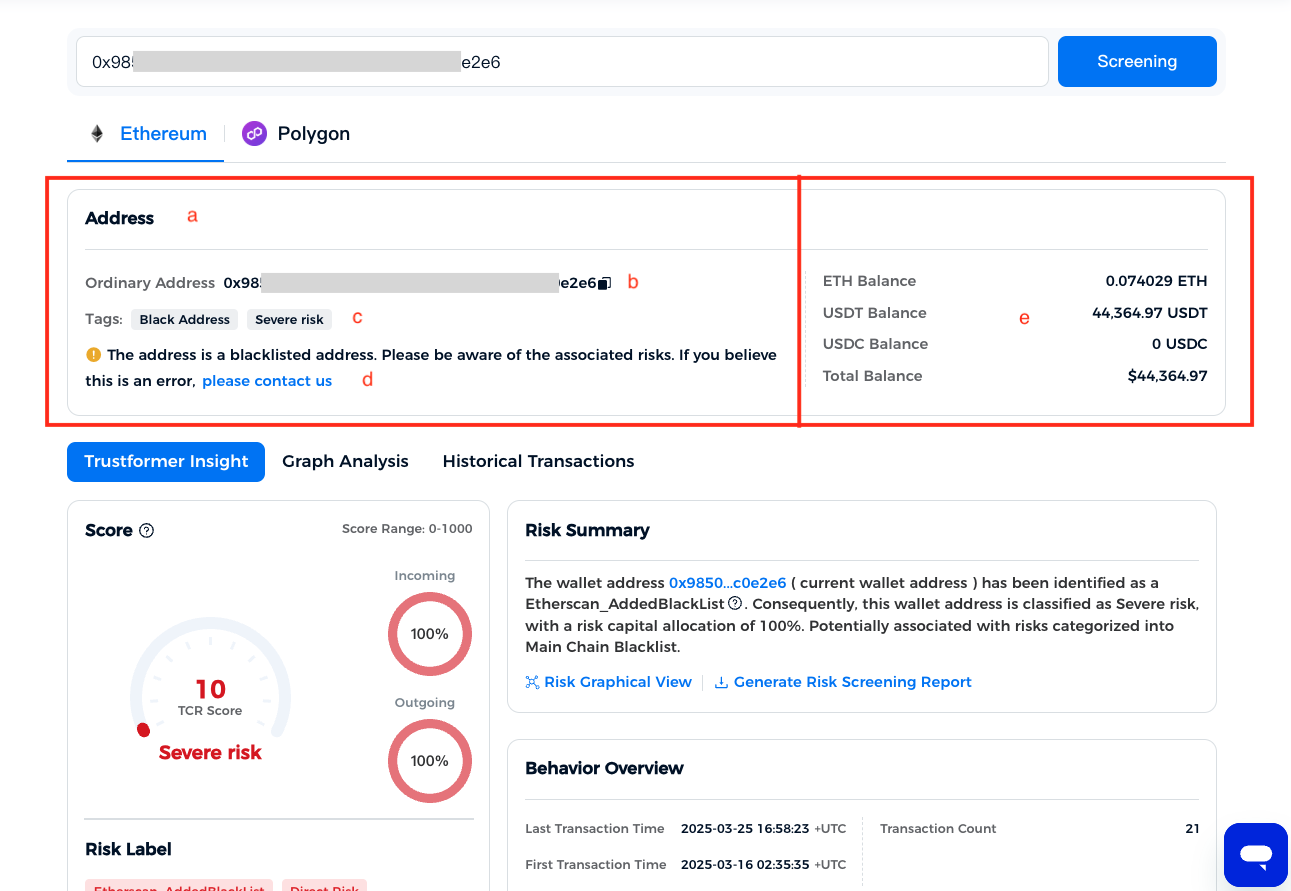
* **a. Object Type**\
Supports the following types: Address, Contract, and Transaction.
* **b. Object Details**\
Displays the type and detailed hash of the analyzed object.
* **c. Object Tags**\
Displays the object's tags. Click \[More>] to view all risk tags, including entity alias, entity type, behavior tags, and relationship tags.
* **d. Blacklist Appeal**\
Users can submit an appeal request.
* **e. Address-Type Objects**\
Displays the current balance, equivalent USDT and USDC balances, and total balance.
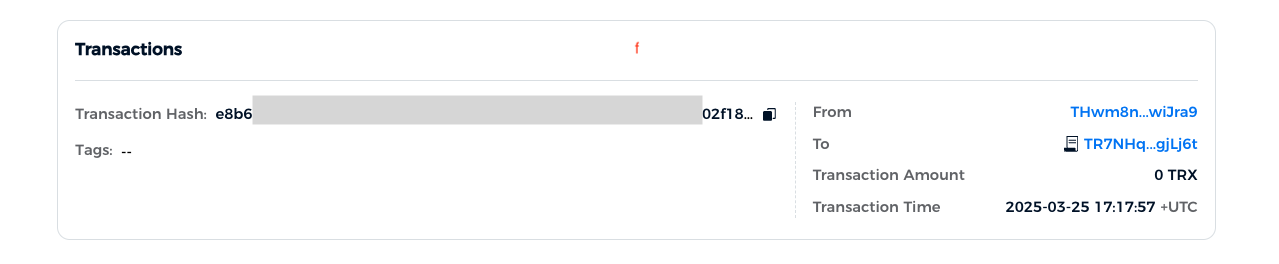
* **f. Transaction-Type Objects**\
Displays information about the sender and receiver of the transaction:
1. **Sender**: If there are multiple senders, a \[.png?alt=media)] button is provided to view all senders.
2. **Receiver**: If there are multiple receivers, a \[.png?alt=media)] button is provided to view all receivers.
3.2.3 Detailed Information
* **a. Information Categories**\
Click the category text to view detailed information for the corresponding classification.
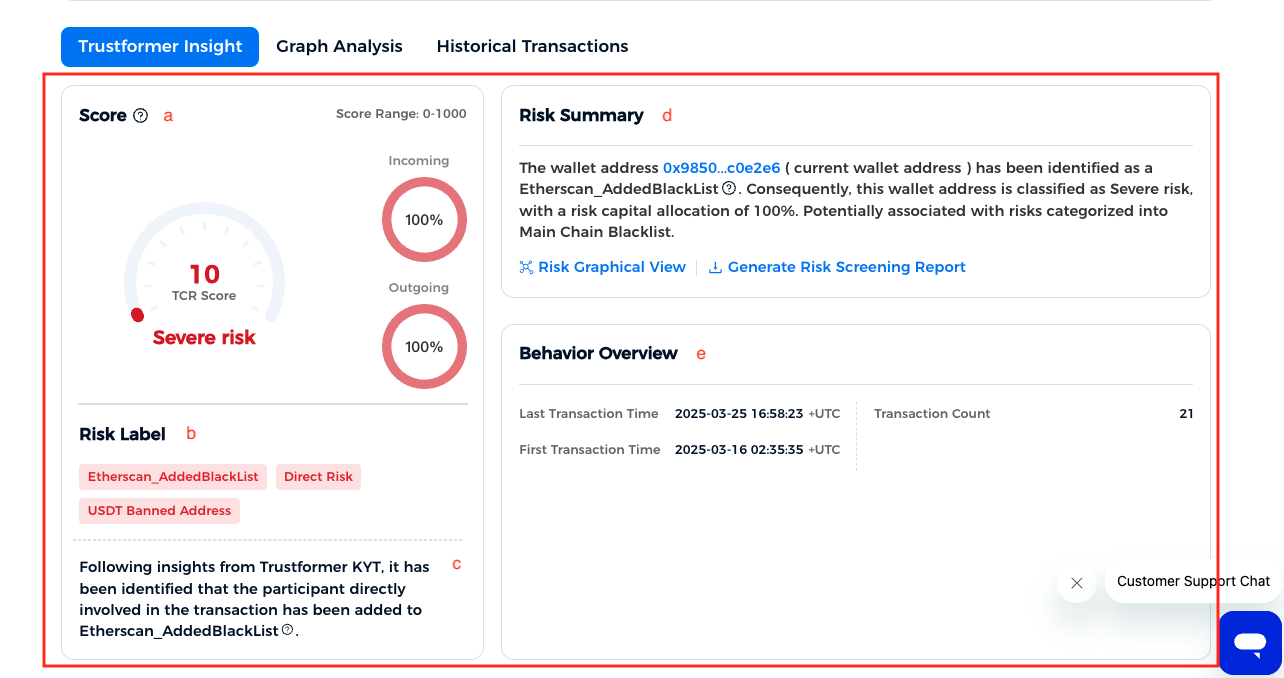
3.2.3.1 Trustformer Insights
Risk
* **a.TCR Score**: Displays the risk score of the analyzed object. Scoring levels and ranges are as follows:
* Excellent Credit: 600 < Trustformer TCR Credit ≤ 1000
* Low Risk: 500 < Trustformer TCR Credit ≤ 600
* Medium Risk: 400 < Trustformer TCR Credit ≤ 500
* High Risk: 200 < Trustformer TCR Credit ≤ 400
* Severe Risk: 0 < Trustformer TCR Credit ≤ 200
* **b.Risk Tags**
Displays risk tags. Click \[More>] to view all tags, including risk level, type, relationship, and geographic information.
* **c.Insights Summary**
Summarizes the results of risk detection.
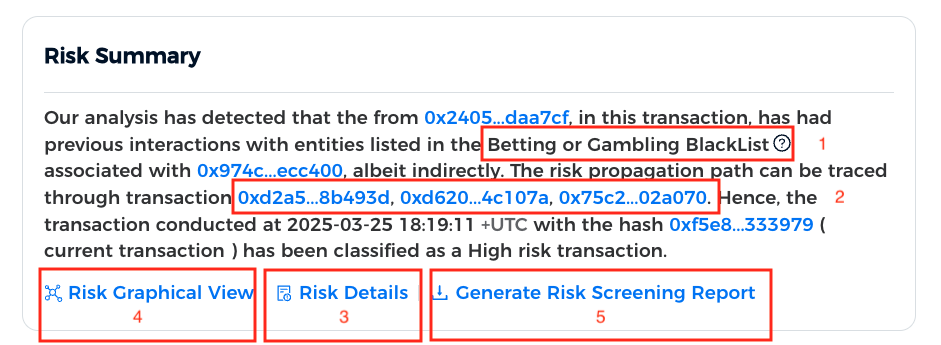
* **d.Risk Source:**Explains the sources of risk for the analyzed object, including:
1. **Risk Categories**: Supports detection of 43 types of risks.
2. **Risk Traceability**: Displays the sources of risk, amounts and proportions of risk, and transmission paths.
3. **View All Risk Sources**: If there are multiple risk sources, click \[Risk Details] to view all details.
4. **Risk Attribution**: Click to view the Risk Attribution Graph, which visualizes the transmission paths of risk sources.
5. Generate Risk Screening Report.
* **e.Behavior Overview**
It is an explanation and display of some key behaviors of the detected object on the chain.
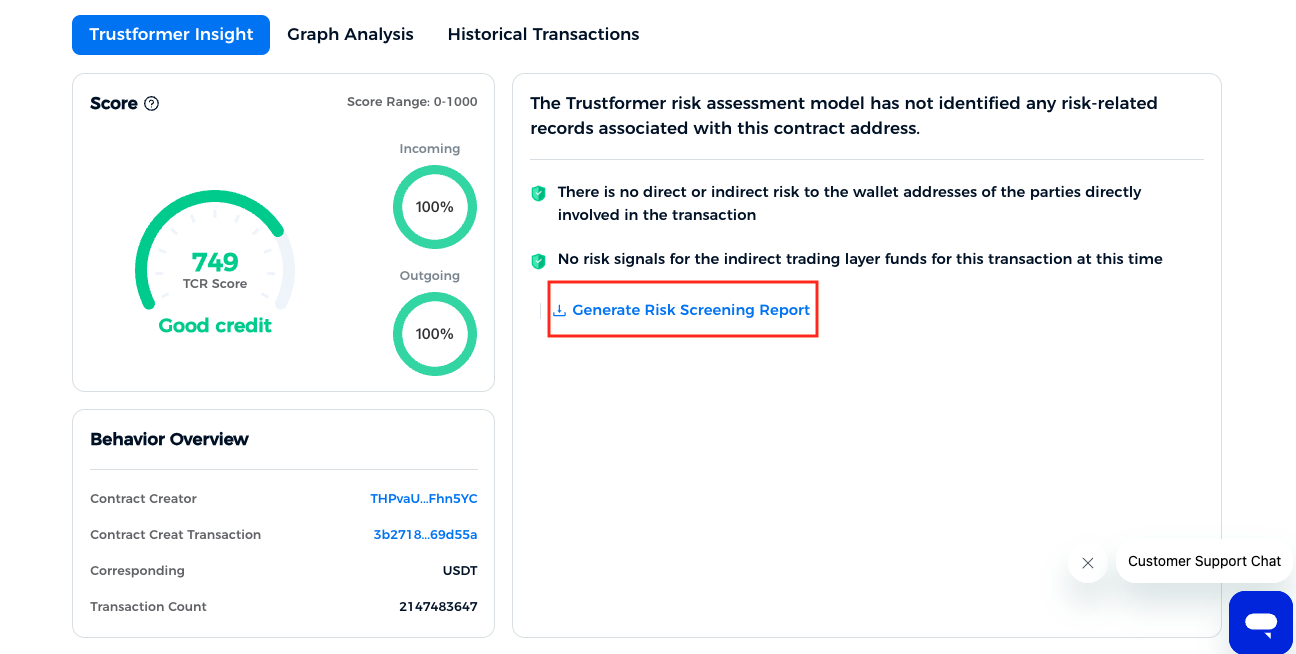
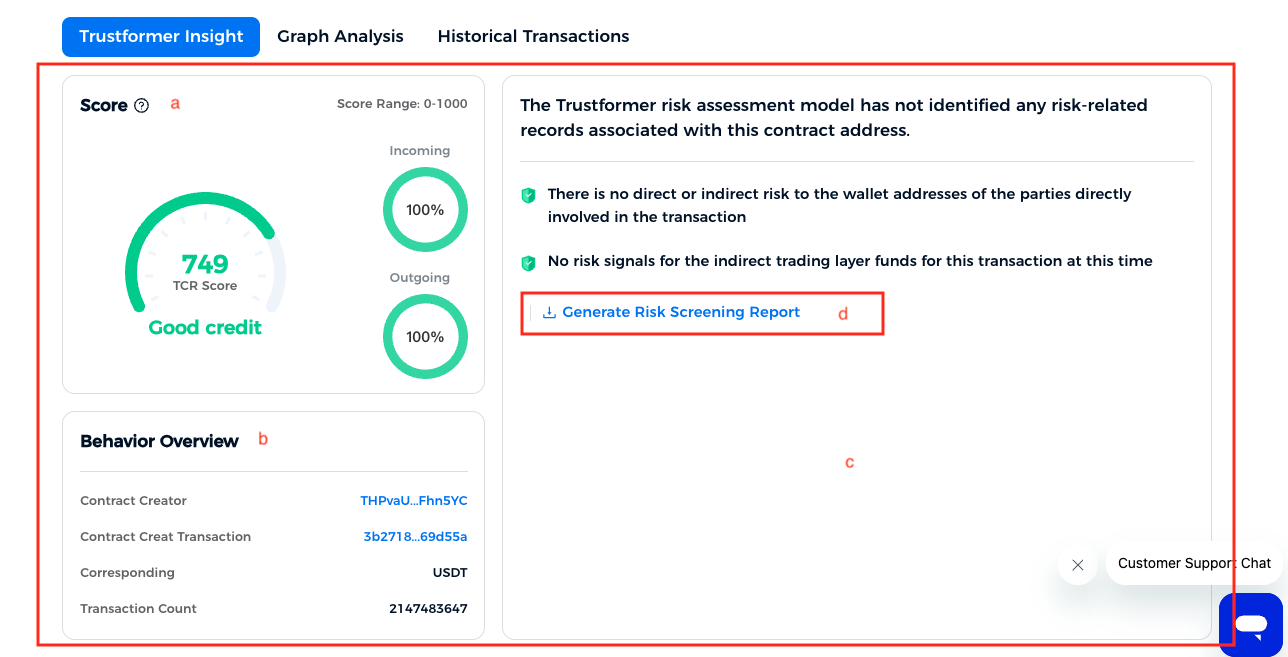
Excellent Credit
* **a.TCR Score**\
For scores above 600, the result is displayed as "Excellent Credit."
* **b. Behavior Overview**\
Summarizes key blockchain behaviors of the analyzed object.
* **c. Insights Results**\
Displays detected risk types.
* **d. Generate Report**\
Generate Risk Screening Report.
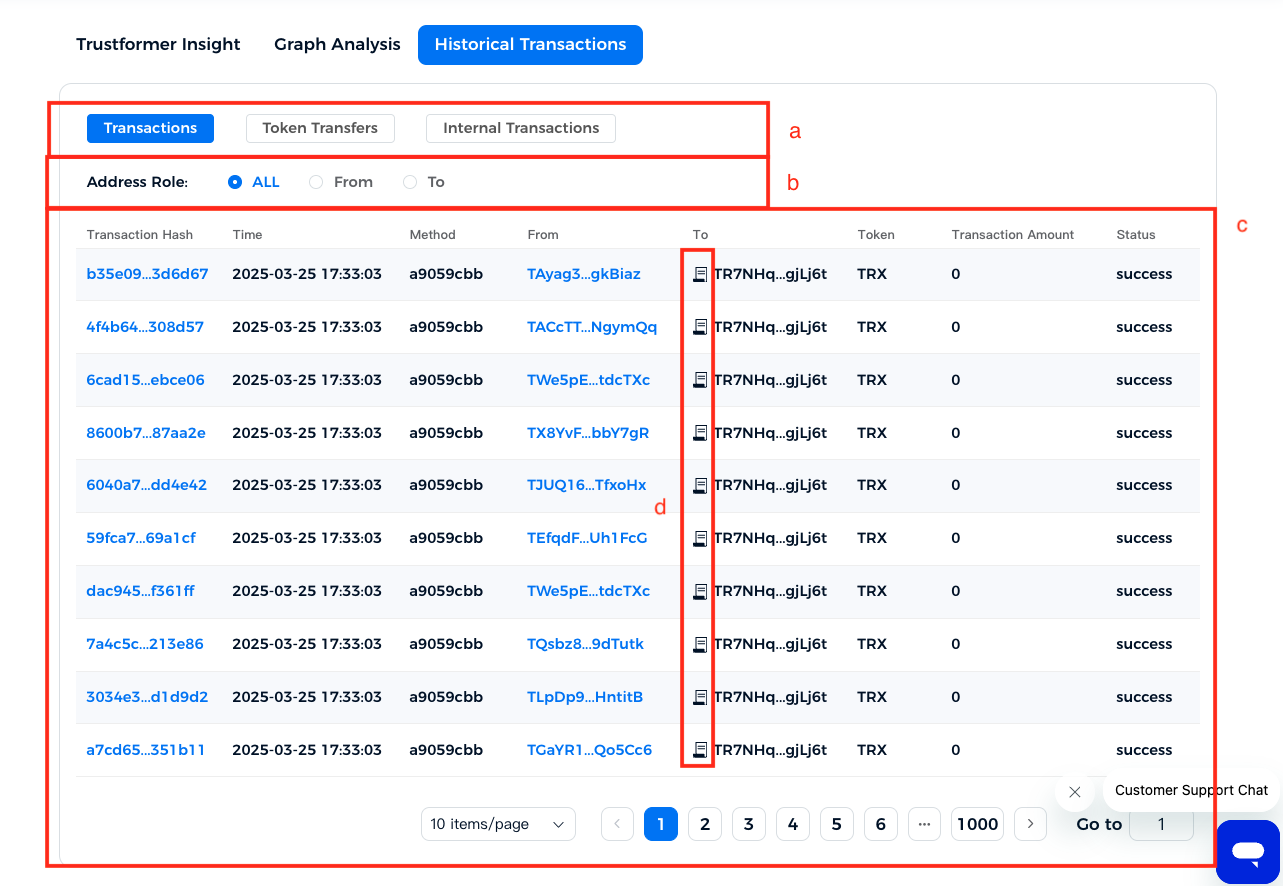
3.2.3.2 Historical Transactions
* **a. Transaction Categories**\
Click the category text to view detailed information about historical transactions of the corresponding type.
* **b. Filter Options**\
Filter transactions by sender, receiver, or click "ALL" to display all data.
* **c. Filtered Results**\
Displays filtered historical transaction records. Clicking any blue text initiates quick risk detection.
* **d. Contract Address Icon**\
Icons indicate addresses belonging to contracts.
3.2.3.3 Graph Analysis
* **a. Recent Transaction Count**\
Use the dropdown menu to select the maximum number of transactions displayed in the graph.
* **b. Graph Tools**\
Provides options for fullscreen, zoom in, zoom out, reset, and image download.
* **c. Legend**\
Explains the meaning of different node and line styles in the graph.
* **d. Graph Canvas**
* **Node Hover**: Displays node information, including entity alias, address, and transaction details.
* **Node Click**: Supports address copying.
* **Node Drag**: Nodes can be freely rearranged for customization.
* **e. One-Click Fund Tracking**\
Redirects to the fund-tracking page.
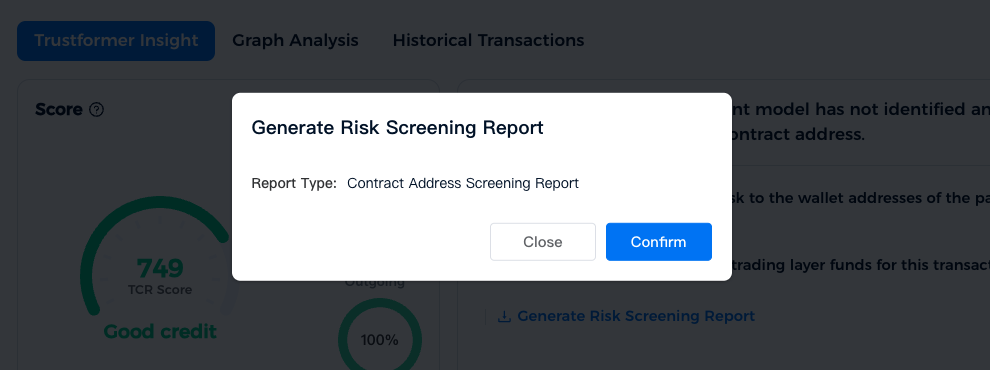
**3.2.4 Generate Risk Screening Report**
* **a. PDF Report Generation**\
Generates a PDF-format risk report based on the user's selected criteria for the current chain.
* **b. Download Report**\
Click \[Confirm] to submit the request. Reports can be downloaded from \[Personal Center] > \[Export & Download].
---
# Agent Instructions
This documentation is published with GitBook. GitBook is the documentation platform designed so that both humans and AI agents can read, navigate, and reason over technical content effectively. Learn more at gitbook.com.
## Querying This Documentation
If you need additional information that is not directly available in this page, you can query the documentation dynamically by asking a question.
Perform an HTTP GET request on the current page URL with the `ask` query parameter, and the optional `goal` query parameter:
```
GET https://center.bokk.ltd/20250327.md?ask=&goal=
```
`ask` is the immediate question: it should be specific, self-contained, and written in natural language.
`goal` is optional and describes the broader end goal you are ultimately trying to accomplish on behalf of the user. GitBook uses it to tailor the answer towards what is most useful for that goal.
The response will contain a direct answer to the question and relevant excerpts and sources from the documentation.
Use this mechanism when the answer is not explicitly present in the current page, you need clarification or additional context, or you want to retrieve related documentation sections.
.png?alt=media)
%20(2).png?alt=media)
.png?alt=media)
.png?alt=media)