> For the complete documentation index, see [llms.txt](https://center.bokk.ltd/llms.txt). Markdown versions of documentation pages are available by appending `.md` to page URLs; this page is available as [Markdown](https://center.bokk.ltd/zh/20250327/zi-jin-zhui-zong-shi-yong-zhi-nan.md).

# 资金追踪使用指南

### 1. 访问网址 <a href="#id-1.-wang-zhi" id="id-1.-wang-zhi"></a>

<https://kyt.trustformer.ai/?#/fundstracking>

### 2. 使用场景 <a href="#id-2.-shi-yong-chang-jing" id="id-2.-shi-yong-chang-jing"></a>

#### 2.1 **个人用户**：查询地址被污染的详细交易路径。 <a href="#id-2.1-ge-ren-diao-cha-di-zhi-bei-wu-ran-de-xiang-xi-jiao-yi-lu-jing" id="id-2.1-ge-ren-diao-cha-di-zhi-bei-wu-ran-de-xiang-xi-jiao-yi-lu-jing"></a>

#### 2.2 **调查员**：分析安全事件中的赃款转移路径，追踪详细交易路径，筛查关键可取证实体。 <a href="#id-2.2-diao-cha-yuan-fen-xi-an-quan-shi-jian-zhong-de-zang-kuan-bei-zhuan-yi-fang-fa-zhui-zong-xiang" id="id-2.2-diao-cha-yuan-fen-xi-an-quan-shi-jian-zhong-de-zang-kuan-bei-zhuan-yi-fang-fa-zhui-zong-xiang"></a>

#### 2.3 **监管机构**：追查洗钱（ML）路径及恐怖融资（TF）的来源与去向。 <a href="#id-2.3-jian-guan-ji-gou-zhui-cha-xi-qian-ml-lu-jing-kong-bu-rong-zi-tf-lai-yuan-qu-xiang" id="id-2.3-jian-guan-ji-gou-zhui-cha-xi-qian-ml-lu-jing-kong-bu-rong-zi-tf-lai-yuan-qu-xiang"></a>

### 3. 功能说明 <a href="#id-3.-gong-neng-shuo-ming" id="id-3.-gong-neng-shuo-ming"></a>

#### 3.1 顶部搜索框 <a href="#id-3.1-ding-bu-sou-suo-kuang" id="id-3.1-ding-bu-sou-suo-kuang"></a>

<figure><img src="https://479772651-files.gitbook.io/~/files/v0/b/gitbook-x-prod.appspot.com/o/spaces%2FVPUmNuC85kYjx0oJPJji%2Fuploads%2Fgit-blob-c3f4a1aac404a0aee6e50dd35aed2414db7d2aa0%2FWX20250326-181502%20(3).png?alt=media" alt=""><figcaption></figcaption></figure>

* **a.支持的链展示**：显示当前支持资金追踪的区块链网络。
* **b.搜索框功能**：输入追踪对象（普通地址、合约地址或交易），点击右侧【Track】按钮启动追踪功能。

#### 3.2 图谱工具区以及图例 <a href="#id-3.2-tu-pu-gong-ju-qu" id="id-3.2-tu-pu-gong-ju-qu"></a>

<figure><img src="https://479772651-files.gitbook.io/~/files/v0/b/gitbook-x-prod.appspot.com/o/spaces%2FVPUmNuC85kYjx0oJPJji%2Fuploads%2Fgit-blob-4b75275f2595c87e6bb682a018c870b5e925e6c1%2FWX20250326-181502%20(4).png?alt=media" alt=""><figcaption></figcaption></figure>

* **a. 工具区**：提供全屏、放大、缩小、复位、图片下载功能，用于调整视图或保存结果。
* **b. 图例**：说明图谱中节点与线条样式所代表的含义。

#### 3.3 资金追踪工作区 <a href="#id-3.4-zi-jin-zhui-zong-gong-zuo-qu" id="id-3.4-zi-jin-zhui-zong-gong-zuo-qu"></a>

**3.3.1 Bitcoin**

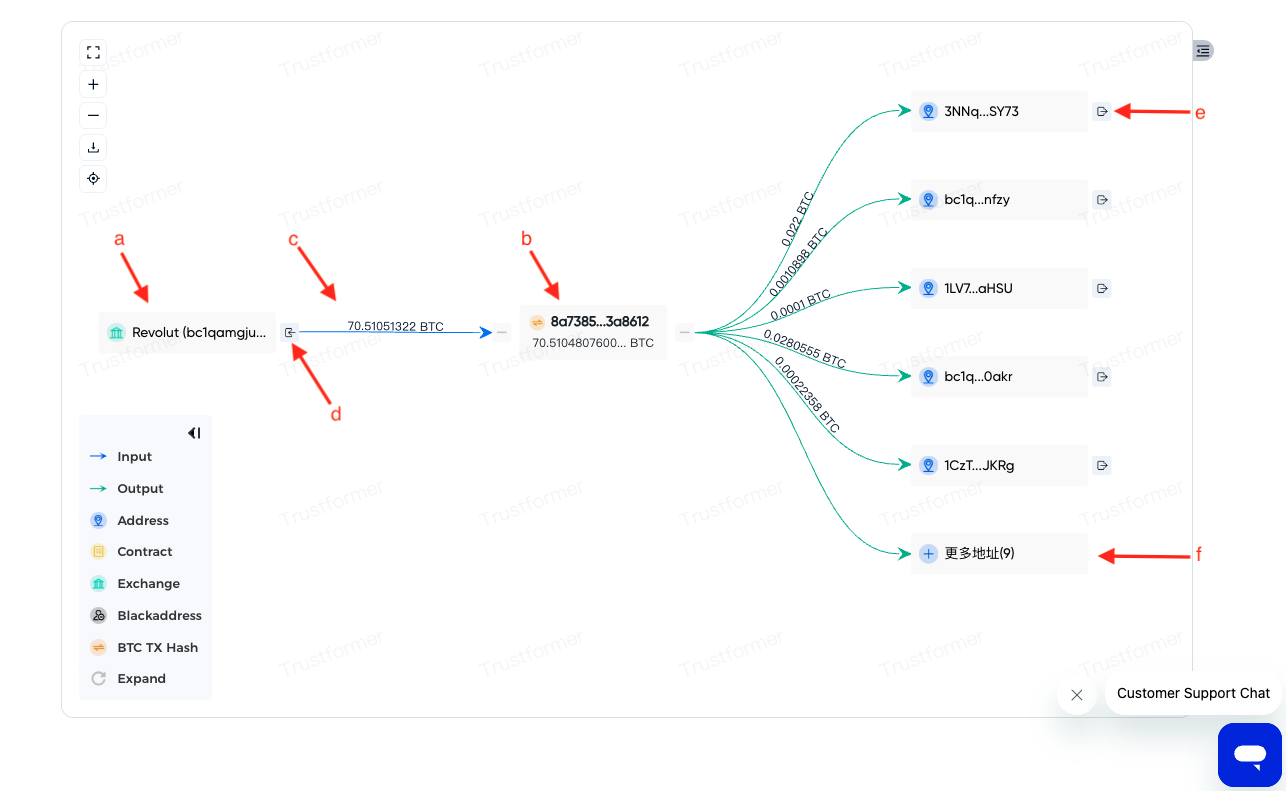
<figure><img src="https://479772651-files.gitbook.io/~/files/v0/b/gitbook-x-prod.appspot.com/o/spaces%2FVPUmNuC85kYjx0oJPJji%2Fuploads%2Fgit-blob-446d25d2bb0d9d92ea7d0f6e1ff8a30e45e5b43c%2FWX20250326-182349.png?alt=media" alt=""><figcaption></figcaption></figure>

* **a. 地址节点**：点击任意地址节点，显示右侧地址详情；节点可自由拖动排版。
* **b. 交易节点**：点击任意交易节点，显示右侧交易详情；节点可自由拖动排版。
* **c. 交易关系线**：线条标注地址发送/接收的BTC数量。
* **d. 追踪资金来源**：点击或悬停地址节点时，可选择追踪资金来源，右侧弹出设置条件的工作区。
* **e. 追踪资金去向**：点击或悬停地址节点时，可选择追踪资金去向，右侧弹出设置条件的工作区。
* **f. 更多地址功能**：点击新增展示参与交易的地址节点，每次增加5个；数字显示未展开地址数量。

**3.3.2 非Bitcoin**

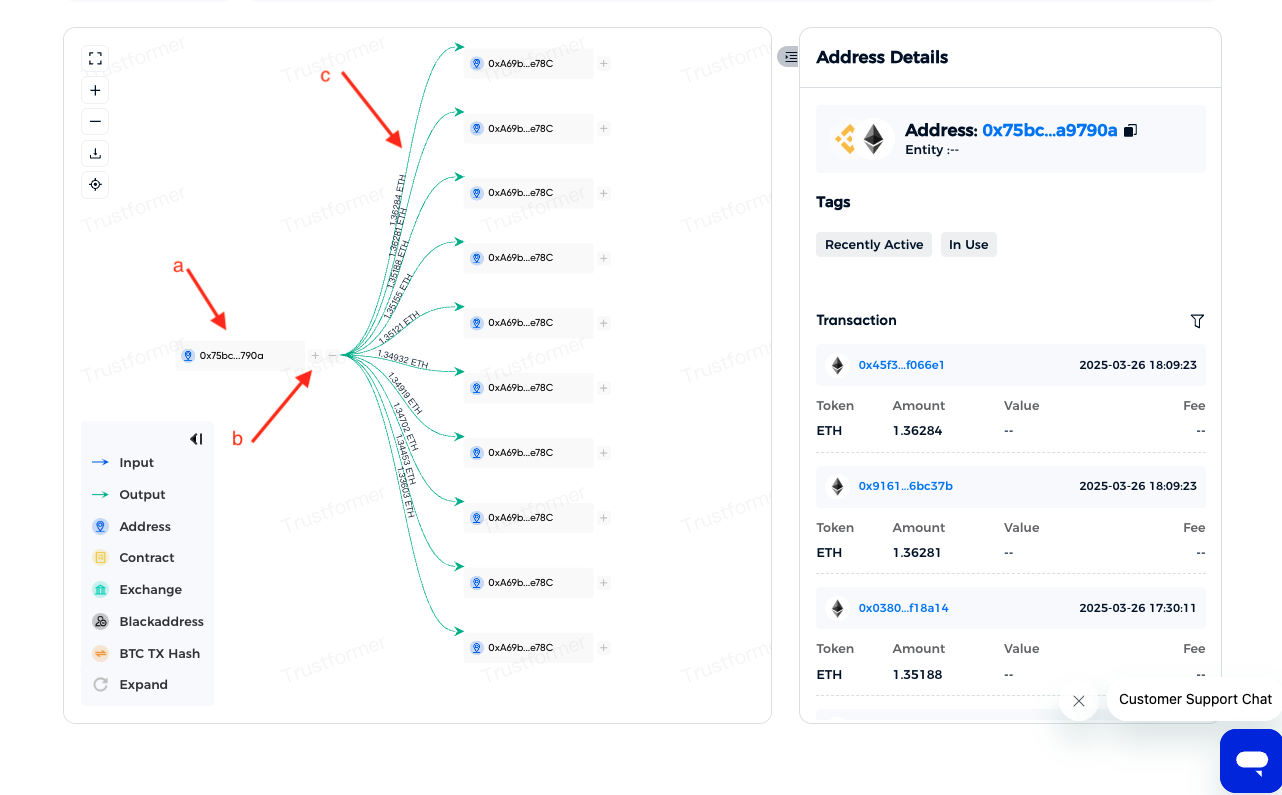
<figure><img src="https://479772651-files.gitbook.io/~/files/v0/b/gitbook-x-prod.appspot.com/o/spaces%2FVPUmNuC85kYjx0oJPJji%2Fuploads%2Fgit-blob-ee97b5d94c3449532a4ad68765ccad943e33c6d2%2FWX20250326-182722.png?alt=media" alt=""><figcaption></figcaption></figure>

* **a. 地址节点**：点击任意节点，显示右侧地址详情；节点可自由拖动排版。
* **b. 设置追踪条件**：点击或悬停地址节点时，选择【指定条件追踪】，右侧弹出设置条件的工作区。
* **c. 交易关系线**：线条标注符合条件的交易笔数；点击线条，显示右侧交易详情。

#### 3.4 详情展示区 <a href="#id-3.5-xiang-qing-zhan-shi-qu" id="id-3.5-xiang-qing-zhan-shi-qu"></a>

**3.4.1 地址详情**

Bitcoin

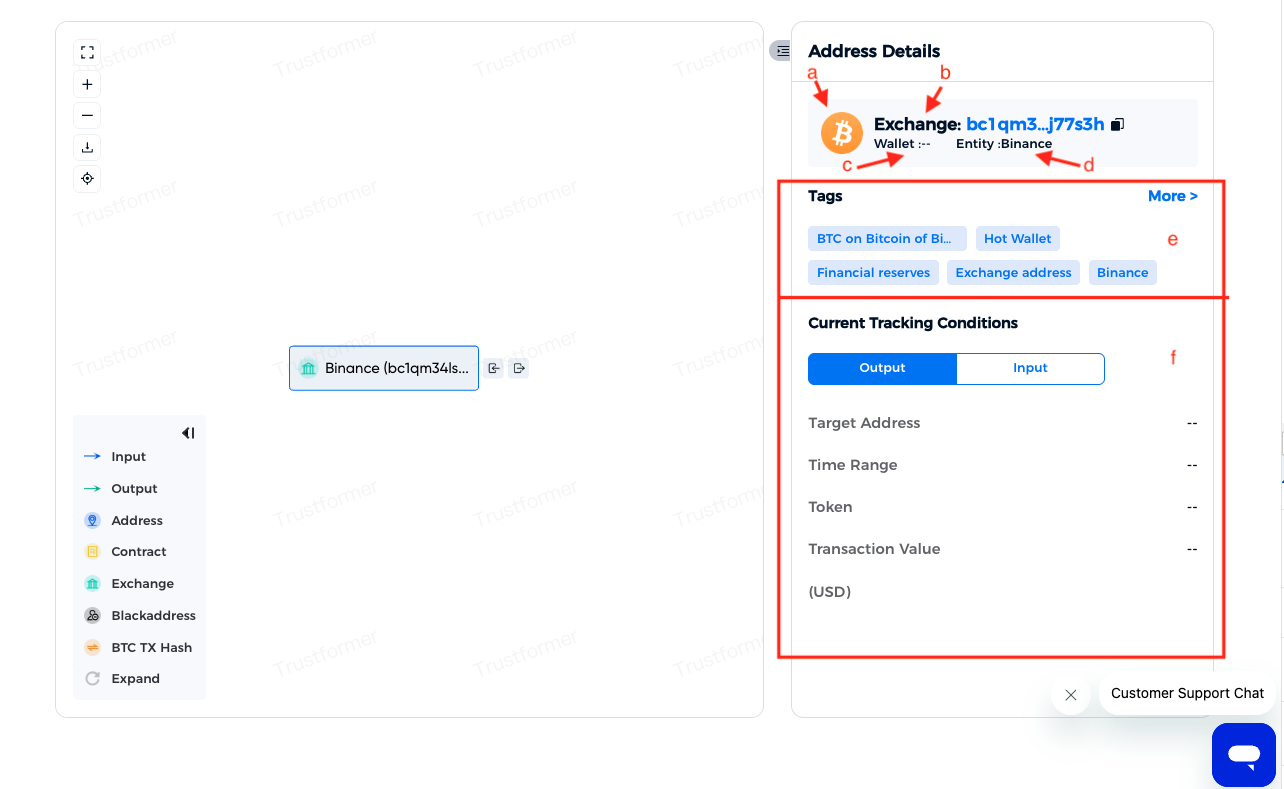
<figure><img src="https://479772651-files.gitbook.io/~/files/v0/b/gitbook-x-prod.appspot.com/o/spaces%2FVPUmNuC85kYjx0oJPJji%2Fuploads%2Fgit-blob-94651edd71e2b9aec03ce208ed4f2d55c7a27142%2FWX20250326-183241.png?alt=media" alt=""><figcaption></figcaption></figure>

<figure><img src="https://479772651-files.gitbook.io/~/files/v0/b/gitbook-x-prod.appspot.com/o/spaces%2FVPUmNuC85kYjx0oJPJji%2Fuploads%2Fgit-blob-d44f8ec03776c3043dad8e8ea2256ac05dd70ff4%2Fimage%20(7).png?alt=media" alt=""><figcaption></figcaption></figure>

* a. 地址所属链
* b. 地址类型（支持地址、合约、交易所、黑名单）。
* c. 地址归属的Bitcoin钱包，点击查看
  1. 返回上一层
  2. BTC钱包名称及钱包说明。
  3. 钱包包含地址数及地址详情。
* d. 实体名称
* e. 地址画像标签。(支持风险标签、行为标签、关系标签等)。
* f. 追踪资金来源/去向功能，切换设置追踪条件的类型。

非Bitcoin

![](https://help.trustformer.ai/~gitbook/image?url=https%3A%2F%2F3247884845-files.gitbook.io%2F%7E%2Ffiles%2Fv0%2Fb%2Fgitbook-x-prod.appspot.com%2Fo%2Fspaces%252FOTowSu5T85KEE2PPcNqt%252Fuploads%252FzVHwMfinguAY4NdzOeAe%252F%25E5%259B%25BE%25E7%2589%25879.png%3Falt%3Dmedia%26token%3D57e201f3-bdb7-4835-898a-a34c80e1a337\&width=768\&dpr=4\&quality=100\&sign=ab145793\&sv=2)

* a. 地址所属链,多个图标表示该地址为多链地址。
* b. 地址类型（支持地址、合约、交易所、黑名单）。
* c. 实体名称
* d. 地址画像标签。(支持风险标签、行为标签、关系标签等)。
* e. 追踪资金来源/去向功能，切换设置追踪条件的类型。

**3.5.2 设置追踪条件**

Bitcoin

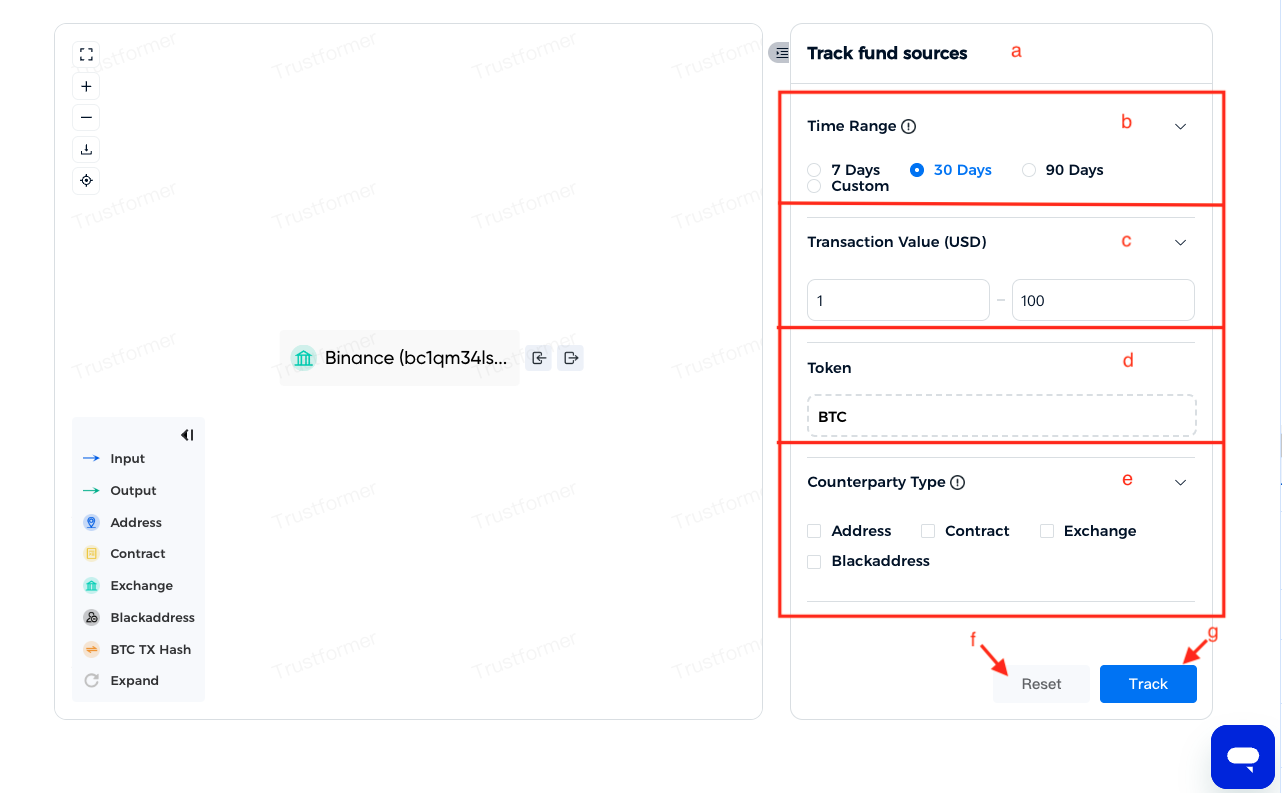
<figure><img src="https://479772651-files.gitbook.io/~/files/v0/b/gitbook-x-prod.appspot.com/o/spaces%2FVPUmNuC85kYjx0oJPJji%2Fuploads%2Fgit-blob-671e2586226adee4304203a23878c83fc7255e6d%2FWX20250326-184046.png?alt=media" alt=""><figcaption></figcaption></figure>

**Bitcoin 追踪条件设置**

* **a. 标题**
* **b. 时间范围：**&#x8BBE;置追踪交易的时间范围。可自定义。
* **c. 交易金额（USD）：**&#x8BBE;置追踪的交易金额范围，包括等于最小值或最大值的区间；空值代表不限制。
* **d. 交易币种：**&#x9009;择追踪的交易币种类。
* **e. 对手类别：**&#x6307;定追踪的交易对手类型，支持以下类别：地址、合约、交易所、黑名单。
* **f. 重置：**&#x70B9;击【重置】按钮，将追踪条件恢复为系统默认值。
* **g. 追踪：**&#x70B9;击【追踪】按钮，左侧图谱展示符合条件的追踪结果。

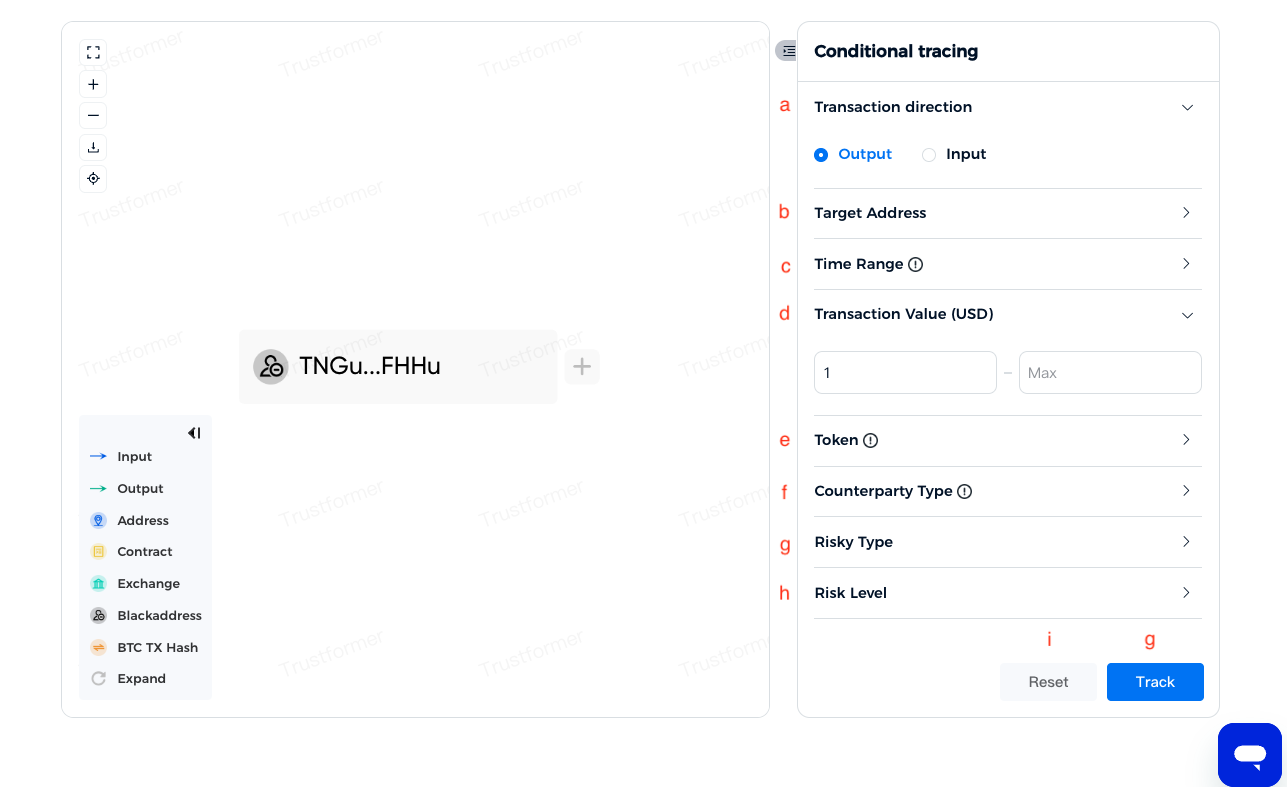
非Bitcoin

<figure><img src="https://479772651-files.gitbook.io/~/files/v0/b/gitbook-x-prod.appspot.com/o/spaces%2FVPUmNuC85kYjx0oJPJji%2Fuploads%2Fgit-blob-33f752301361441f3c7aef68be6fc729bb832e7e%2FWX20250326-191224.png?alt=media" alt=""><figcaption></figcaption></figure>

* **a. 条件功能切换：**&#x5728;“资金去向”和“资金来源”之间自由切换，设置对应的追踪条件。
* **b. 目标地址**
* **c. 时间范围：**&#x8BBE;置追踪交易的时间范围。可自定义。
* **d. 交易金额（USD）：**&#x8BBE;置追踪的交易金额范围，包括等于最小值或最大值的区间；空值代表不限制。
* **e. 交易币种：**&#x9009;择追踪的交易币种类。
* **f. 对手类别：**&#x6307;定追踪的交易对手类型，支持以下类别：地址、合约、交易所、黑名单。
* **g. 目标交易类型：**&#x42;lacklist，Sanctions，Security。
* **h: 风险层级：**&#x9009;择追踪的风险层级，可自定义。
* **e. 重置：**&#x70B9;击【重置】按钮，将追踪条件恢复为系统默认值。
* **j. 追踪：**&#x70B9;击【追踪】按钮，左侧图谱展示符合条件的追踪结果。

**3.5.3 交易详情**

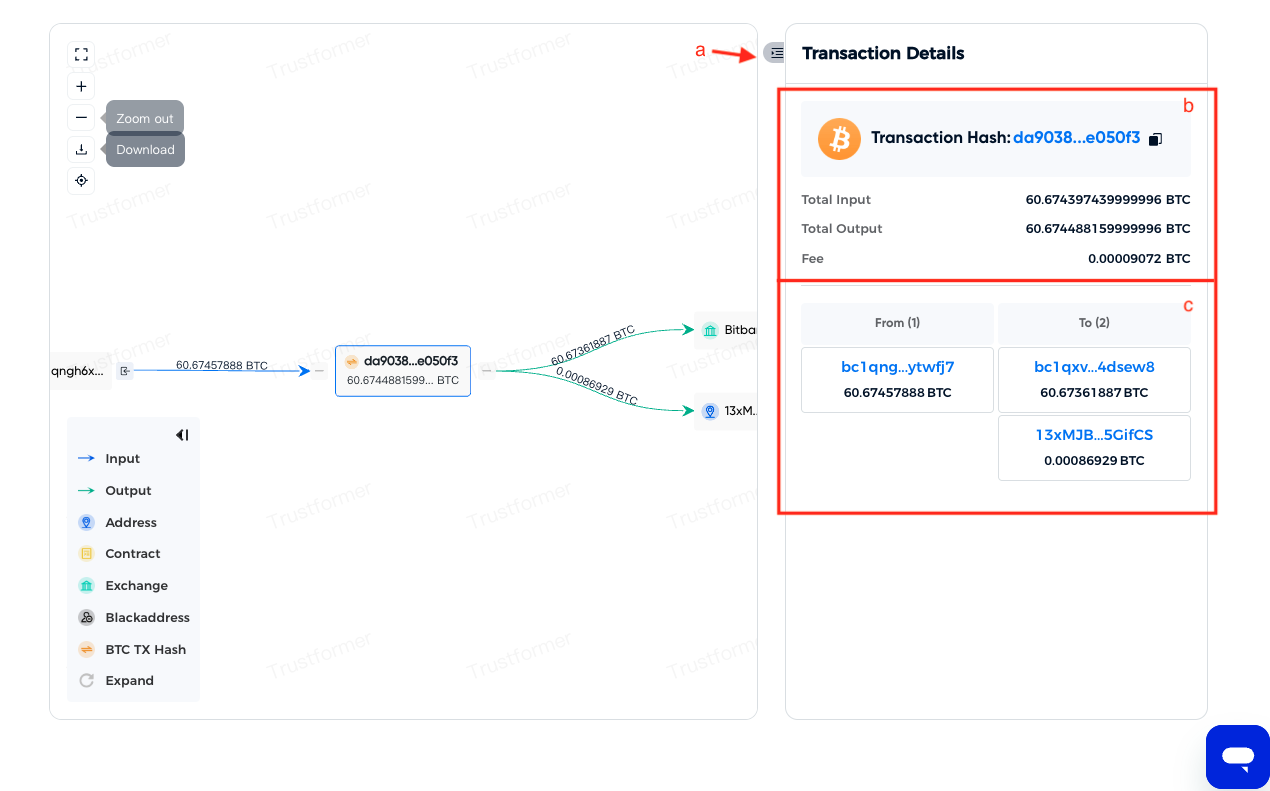
Bitcoin

<figure><img src="https://479772651-files.gitbook.io/~/files/v0/b/gitbook-x-prod.appspot.com/o/spaces%2FVPUmNuC85kYjx0oJPJji%2Fuploads%2Fgit-blob-af35b5538ebae2daae0ff4a59062c2470a0f8097%2FWX20250326-191945.png?alt=media" alt=""><figcaption></figcaption></figure>

* **a. 展开/收起详情展示区：**&#x4FBF;于查看或隐藏交易的详细信息。
* **b. 交易基础信息展示**：显示交易的基本信息，包括交易时间、交易哈希、涉及金额等关键数据。
* **C. 参与交易的地址信息**：支持滚动操作以查看更多完整的地址信息。

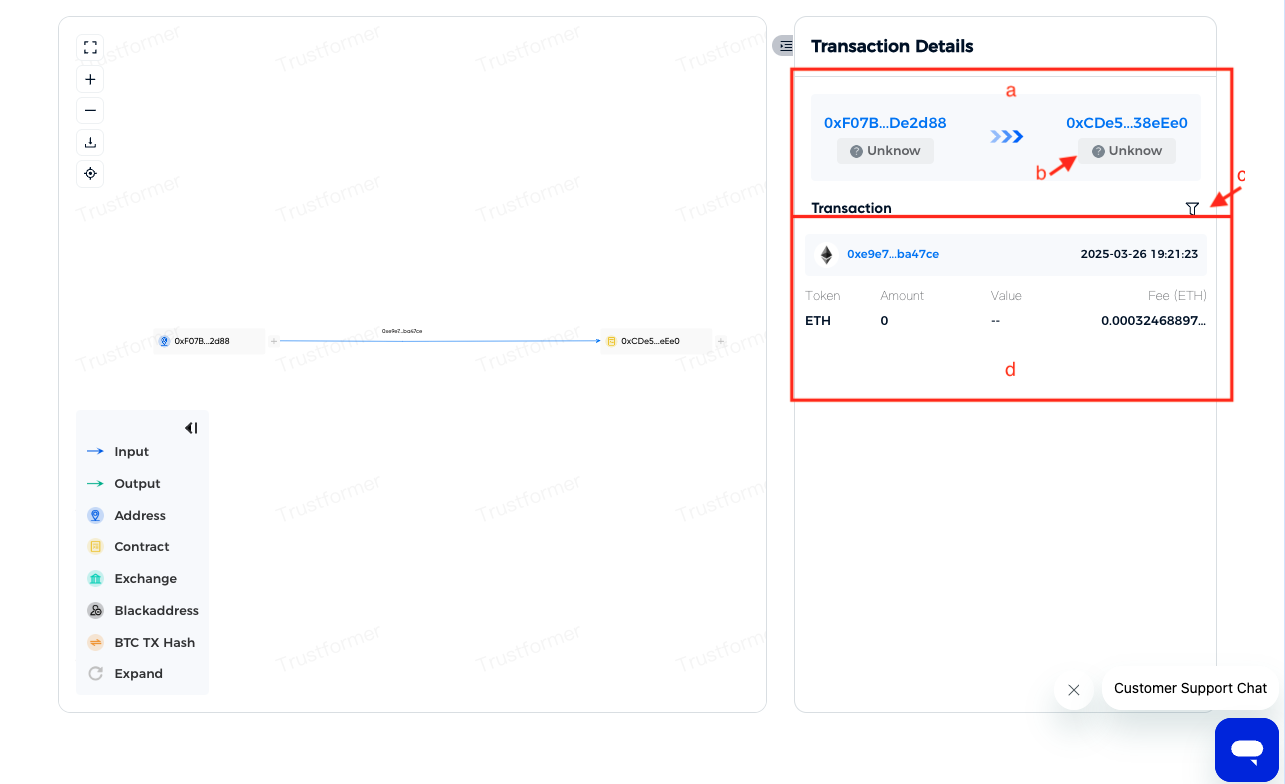
非Bitcoin

<figure><img src="https://479772651-files.gitbook.io/~/files/v0/b/gitbook-x-prod.appspot.com/o/spaces%2FVPUmNuC85kYjx0oJPJji%2Fuploads%2Fgit-blob-4516a12c67f566bd74e3e17dc15acc09c937fa89%2FWX20250326-192534.png?alt=media" alt=""><figcaption></figcaption></figure>

* **a. 参与交易的地址信息**：箭头方向代表资金流向。
* **b. 地址实体别名展示**：显示参与交易地址对应的实体别名（如钱包名称或标签）。

<figure><img src="https://help.trustformer.ai/~gitbook/image?url=https%3A%2F%2F3247884845-files.gitbook.io%2F%7E%2Ffiles%2Fv0%2Fb%2Fgitbook-x-prod.appspot.com%2Fo%2Fspaces%252FOTowSu5T85KEE2PPcNqt%252Fuploads%252FUU5CgNGCEcjRxgYep1jp%252F%25E5%259B%25BE%25E7%2589%258714.png%3Falt%3Dmedia%26token%3Db07307bd-44d3-433d-bcd0-5f67ea072201&#x26;width=768&#x26;dpr=4&#x26;quality=100&#x26;sign=6e4fb83b&#x26;sv=2" alt=""><figcaption></figcaption></figure>

* **c. 交易筛选功能入口：**&#x5F53;两个地址之间的交易数量较多时，可使用筛选功能精确定位目标交易
  1. **返回上一页**
  2. **代币筛选：**&#x70B9;击下拉框可查看该组交易中包含的所有代币种类。
  3. **交易数量范围筛选：**&#x53EF;设置筛选区间，包含等于最小值和最大值的交易记录，空值代表无限制。
  4. **交易时间范围筛选：**&#x8BBE;置起始时间和结束时间，空值代表无限制。
* **d. 符合条件的全部交易明细:**&#x5C55;示经过筛选条件过滤后的交易详细信息。支持滚动操作，可查看更多交易记录.


---

# Agent Instructions
This documentation is published with GitBook. GitBook is the documentation platform designed so that both humans and AI agents can read, navigate, and reason over technical content effectively. Learn more at gitbook.com.

## Querying This Documentation
If you need additional information that is not directly available in this page, you can query the documentation dynamically by asking a question.

Perform an HTTP GET request on the current page URL with the `ask` query parameter, and the optional `goal` query parameter:

```
GET https://center.bokk.ltd/zh/20250327/zi-jin-zhui-zong-shi-yong-zhi-nan.md?ask=<question>&goal=<endgoal>
```

`ask` is the immediate question: it should be specific, self-contained, and written in natural language.
`goal` is optional and describes the broader end goal you are ultimately trying to accomplish on behalf of the user. GitBook uses it to tailor the answer towards what is most useful for that goal.

The response will contain a direct answer to the question and relevant excerpts and sources from the documentation.

Use this mechanism when the answer is not explicitly present in the current page, you need clarification or additional context, or you want to retrieve related documentation sections.