> For the complete documentation index, see [llms.txt](https://center.bokk.ltd/llms.txt). Markdown versions of documentation pages are available by appending `.md` to page URLs; this page is available as [Markdown](https://center.bokk.ltd/zh/20250528/ji-chu-gong-neng-jie-shao/openapi-yi-biao-pan-shi-yong-zhi-nan.md).
# OPENAPI 仪表盘使用指南
### 一、功能概述
OPENAPI 仪表盘致力于为产品团队、风控人员和运营人员提供全面、实时且精准的数据统计分析。通过清晰展示各类关键数据和趋势,助力用户及时发现潜在问题、评估风控效果,进而为后续的产品优化、风控策略调整以及运营决策提供有力的数据支撑。
### 二、核心功能
OPENAPI 仪表盘仪表盘具备以下核心功能:
* 展示 API 接口调用行为的总体趋势与分布。
* 显示不同风险等级命中情况的数量及趋势。
* 分析各主链上的风险分布与等级分布。
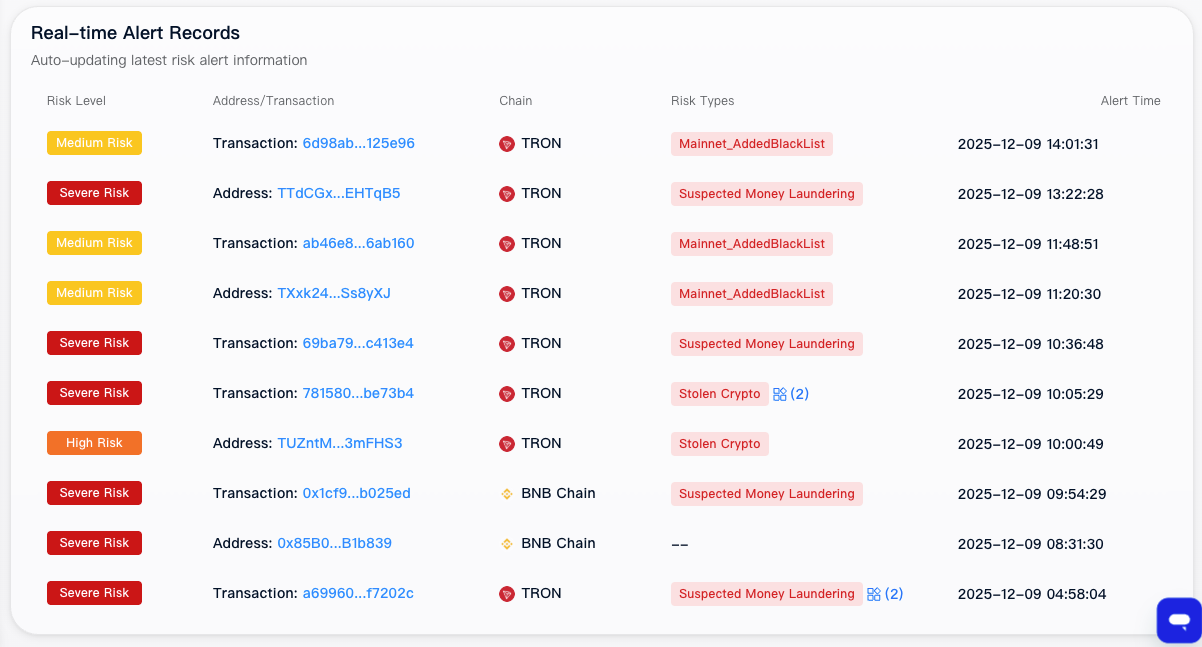
* 实时展示最新的地址与交易告警信息。
* 支持多种时间区间选择进行查询(近 1 天、近 7 天)。
### 三、功能使用指南
#### 1. 数据指标概览
在仪表盘的首页,您可以快速查看以下关键数据指标:
* **总调用量**:显示OPENAPI 接口的总调用次数。
* **今日调用**:显示当天 OPENAPI 接口的调用次数。
* **总告警数**:显示触发的总告警数量。
* **今日告警**:显示当天触发的告警数量。
#### 2. 时间范围筛选
您可以通过时间范围筛选功能,查看不同时间段内的图表数据。支持以下时间范围选择:
* **近1天**(默认):显示最近一天的数据。
* **近7天**:显示最近七天的数据。
#### 3. 图表模块
**3.1 API调用趋势(折线图)**
展示每日调用 API 的数量,默认展示最近14天的数据。通过折线图,您可以直观地看到 API 调用量的变化趋势。
**3.2 风险等级分布(饼图)**
展示命中以下等级风险的数量:严重风险、高风险、中风险、低风险、无风险。通过饼图,您可以快速了解各种风险等级的占比情况。
**3.3 各主链风险统计(堆叠柱状图)**
展示不同主链上的告警数量,按风险等级分类。通过堆叠柱状图,您可以清晰地看到各主链上不同风险等级的告警分布情况。
**3.4 每日风险命中趋势(堆叠柱状图)**
展示每日风险命中趋势图,按风险等级分类。,默认展示最近14天的数据。通过堆叠柱状图,您可以了解每日不同风险等级的命中情况及其变化趋势。
#### 4. 实时滚动报警列表
仪表盘底部设有实时滚动报警列表,每3秒更新一次,滚动展示最新的10条交易/地址告警记录。告警记录包含以下字段:
* **告警时间**:告警发生的时间。
* **地址或交易哈希**:触发告警的地址或交易哈希值。
* **命中的风险类型**:告警触发的风险类型。
* **所属链**:告警发生的区块链网络。
* **风险等级**:告警的风险等级。
您可以通过点击告警记录,跳转至地址/交易详情页,查看更详细的信息。
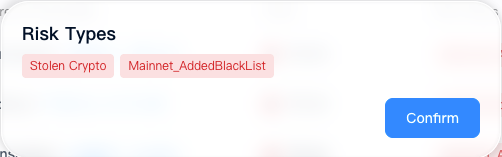
若包含多个风险类型,可点击图标 %20\(1\)%20\(1\)%20\(1\).png?alt=media) 查看所有。
希望本手册能帮助您顺利使用Trustformer KYT的“ 仪表盘”功能。希望本手册能帮助您更好地利用仪表盘进行数据分析和决策支持。如有任何疑问或建议,请随时联系我们的客服人员。
---
# Agent Instructions
This documentation is published with GitBook. GitBook is the documentation platform designed so that both humans and AI agents can read, navigate, and reason over technical content effectively. Learn more at gitbook.com.
## Querying This Documentation
If you need additional information that is not directly available in this page, you can query the documentation dynamically by asking a question.
Perform an HTTP GET request on the current page URL with the `ask` query parameter, and the optional `goal` query parameter:
```
GET https://center.bokk.ltd/zh/20250528/ji-chu-gong-neng-jie-shao/openapi-yi-biao-pan-shi-yong-zhi-nan.md?ask=&goal=
```
`ask` is the immediate question: it should be specific, self-contained, and written in natural language.
`goal` is optional and describes the broader end goal you are ultimately trying to accomplish on behalf of the user. GitBook uses it to tailor the answer towards what is most useful for that goal.
The response will contain a direct answer to the question and relevant excerpts and sources from the documentation.
Use this mechanism when the answer is not explicitly present in the current page, you need clarification or additional context, or you want to retrieve related documentation sections.
.png?alt=media)
.png?alt=media)
.png?alt=media)
.png?alt=media)
.png?alt=media)
.png?alt=media)